
Learn to manage Google Ad Grants in 2 hours
Stop wasting the grant budget. Learn the practical steps, templates, and tools to get better results quickly without spending thousands on consultants.
Online course
Immediate access
100% practical
Short and easy to apply
Templates included
Keywords and dashboards
Money-back guarantee
Try it risk-free for 7 days
100% practical course
Quick results
Learn in a couple of hours how to configure great campaigns and use properly your $10,000/month budget
Expert advice
Get help from an expert in Ad Grants to solve your questions and issues. Quicker and safer than trying to figure it out by yourself.
Satisfaction guaranteed
Check the course for 7 days. If it’s not what you expected, I will refund your money. Try without risk, you have nothing to lose.
Better campaigns
Dozens of tips to create stronger campaigns, understand what matters, and start seeing improvements quickly.
Save time
Use Pmax, AI tools, and other tactics to improve results without making the account harder to manage.
Avoid common risks
Avoid the errors that waste time and budget in many nonprofit accounts, from structure to tracking and compliance.
Templates, dashboards, and examples included
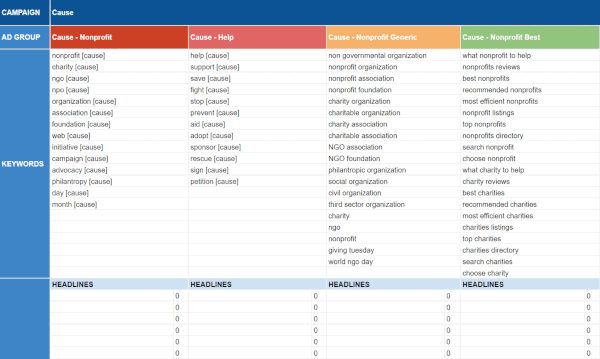
Bonus 1: Templates for campaigns
- +500 keywords targeted to nonprofit campaigns.
- +30 landing page examples from other organizations.
- Ad writing section to draft and review ads with character limit alerts.
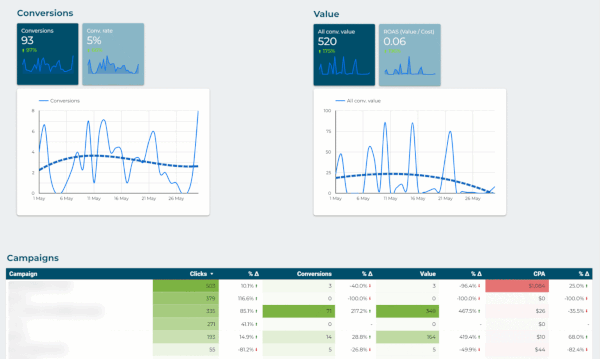
Bonus 2: Dashboards and alerts
- Complete dashboard for detailed account review.
- Summary dashboard for quick reviews and internal sharing.
- Alerts dashboard to detect errors and improvement opportunities.
Learn from a Google Ad Grants expert

Frequently asked questions
What makes this course different from other courses or free guides?
It is a short and 100% practical operating guide for Google Ad Grants. It focuses on the decisions that really make the difference for Ad Grants accounts (which are not the same as in normal Google Ads accounts): choosing the right campaign topics and structure, finding the right settings, avoiding common errors and policy issues, tracking conversions, and knowing what to review after launch.
The course is deliberately concise because your time is valuable. It brings together recurring questions, mistakes, and decisions from real nonprofit accounts. Then pairs the lessons with templates, examples, checklists, and dashboards. Everything is designed so you can apply what you learn on your own account quickly and easily.
Who is this course for?
It is for nonprofit staff and teams who manage their own Google Ad Grants account. But it can also help if you want to understand what your external agency is doing, or want to know the basics before asking for outside help.
What will I learn?
Google Ads has hundreds of settings and possible strategies. The course concentrates on what nonprofits actually need to create and maintain better Ad Grants campaigns with less wasted time. You will learn how to choose useful themes and goals, organise campaigns, configure key settings such as bids, budgets and ads, and avoid mistakes that quietly limit performance.
It also covers practical ways to generate ideas with AI, use helpful automation and rules, interpret results, improve landing pages and conversion tracking, and recognise automatic recommendations that may harm performance. The goal is not to turn you into a Google Ads specialist, but to help you get good results from Ad Grants in a few hours.
Do I need Google Ads experience? Is it suitable for a small, non-technical organization?
No advanced experience is required. The course explains the key concepts in plain language and is designed for small and medium nonprofits that need practical results without a large budget, a technical team, or a lengthy implementation project.
More advanced tactics are included where they are useful, but the course does not assume you need to master every Google Ads feature. It helps you focus on the work that matters most for a grant account.
What format does the course use?
The course is online and text-based, with images, screenshots, templates, and supporting tools. Compared to in-person or video courses, this format makes it quicker to scan, easier to revisit while working in an account, and simpler to keep current when Google changes features, requirements, or recommended tactics.
You can start immediately after purchase. Most teams can read the core lessons in a few hours and use the checklists, templates, and examples while building or reviewing campaigns during the same week.
Is the course updated when Google changes Ad Grants?
Yes. We update the course when there are new relevant Ad Grants rules, Google Ads features, or recommended tactics. Because the lessons are text-based, we can introduce updates more quickly than in a video course. Our focus is on changes that really affect nonprofits, rather than every minor Google Ads announcement.
Who created the course?
The course was created by Miguel Ángel García, a consultant specialised in Google Ad Grants and nonprofit marketing. It is based on the questions, mistakes, and account decisions that we see every day in real nonprofit work. It’s not generic Google Ads training material.
Can several people from our organization take the course?
Yes. Individual access is the standard option. If several colleagues need access, contact us for group pricing so it can reflect the number of learners, and whether your team also needs a shared review or additional support.
What happens if we are not satisfied?
We will give you your money back. The course includes a 7-day money-back guarantee: if it is not what you expected, let us know within the first seven days after purchase and tell us what did not work for you. Your feedback helps improve the course and the guarantee lets you try it without risk.
What if I have more questions or need other help?
Contact us. We can answer questions about whether the course is the right fit. Also, we can discuss if you want other services, including account audits and management. If you have the budget, an audit after applying the course is often the fastest way to identify all the opportunities in your campaigns.
Ready to improve your Google Ad Grants account?
Buy the course and get the practical guide, templates, dashboards, and examples in one package. Try it for 7 days, with zero risk. If it’s not what you expected, let me know and I will give your money back.